Account Discovery
Account Discovery and onboarding of privileged accounts across multiple systems, applications, and cloud infrastructure providers
| Type | Description |
|---|---|
| Add Account Manually | Allows administrators to directly register privileged accounts into the system without waiting for automated discovery. This ensures critical accounts such as newly created service accounts, specialized administrator credentials, or accounts in isolated environments are immediately governed. |
| Automation | Automation streamlines processes and can eliminate manual intervention while maintaining uninterrupted visibility into privileged accounts. This continuous oversight ensures comprehensive awareness of the privileged access landscape, thereby strengthening governance and reinforcing enterprise security. The auto-discovery and management capabilities optimize operational efficiency by reducing time requirements and eliminating administrative complexity. They further ensure that newly introduced privileged assets are rapidly brought under governance, reinforcing organizational control and strengthening overall security posture. |
| Account Discovery in Active Directory |
|
You can execute an Account Discovery job to identify and optionally onboard local accounts within a chosen category — Database, Directory Server, or Operating System. It is recommended to perform the scan during off-peak hours to ensure better bandwidth availability and minimize potential disruptions.
To run this job successfully, your account must be configured as a management account — an administrator-level account defined under Account Defaults with its role set to management.
- Log in to the system and choose PAM from the product navigator.
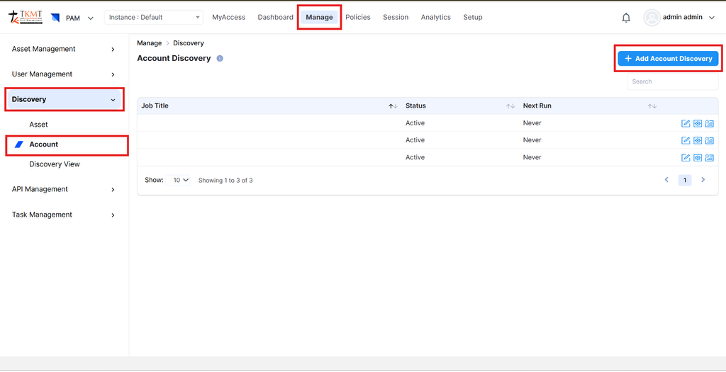
- Navigate to Manage → Discovery → Account → Add Account Discovery.

Manage → Discovery → Account → Add Account Discovery
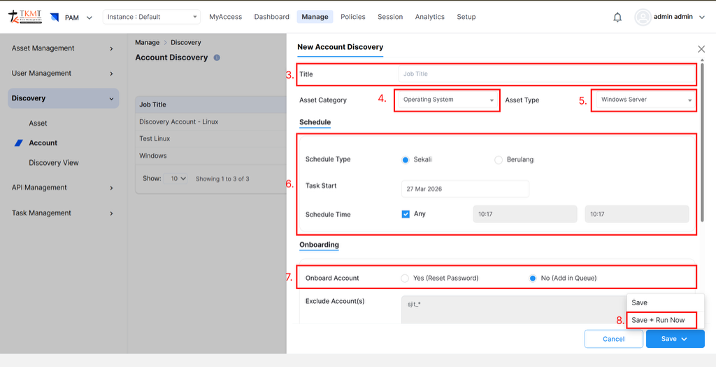
- Provide a Job Title.
- Choose the Asset Category — such as Database, Directory Server, or Operating System.
- Select the appropriate Asset Type from the dropdown list.
- Configure the Schedule Type:
- Once – run the job a single time at a specified date and time.
- Recurring – run the job automatically at regular intervals.
- Indicate whether you want the discovered accounts to be onboarded.
- Click Save + Run Now to initiate the account discovery process.

Click Save + Run Now to initiate the discovery process