

Session Management
Management, monitoring, recording, remote and auditing for privileged sessions — including remote privileged sessions
To facilitate compliance validation and forensic analysis, User Activity Logging captures comprehensive session data for all privileged accounts, allowing auditors to efficiently trace and review user behavior. To protect organizational assets from unauthorized access, the PAM solution provides oversight of all user sessions and maintains a comprehensive audit trail by capturing event logs in both visual (video) and textual (command) formats.
| Interface | Session Type | Event Logging Method |
|---|---|---|
| Over-Browser | SSH | Video, Command Inputs |
| RDP | Video, Process Inputs | |
| File Transfer (FTP/SFTP) — FTP ↔ SFTP, SFTP ↔ Local, FTP ↔ Local, FTP ↔ FTP, SFTP ↔ SFTP | Command Inputs | |
| Database (MySQL, Oracle SQL) | Command Inputs | |
| Launcher Based | SSH | Video, Command Inputs |
| RDP | Video, Process Inputs | |
| Telnet | Video | |
| File Transfer (FTP/SFTP) — FTP ↔ SFTP, SFTP ↔ Local, FTP ↔ Local, FTP ↔ FTP, SFTP ↔ SFTP | Metadata (Command Inputs) | |
| Browser Based (URL Based) | Video, Metadata | |
| Thick Client Based | Video | |
| Jump Server | Thick Client Based | Video |
Threat Risk Analytics provides organizations with a comprehensive framework for monitoring user sessions and assessing imminent risks to proactively mitigate potential attack impacts. By leveraging Machine Learning, the system identifies hidden attack surfaces and generates advanced, data-driven insights to prevent unauthorized activities.
Threat Risk Analytics provides administrators and auditors with comprehensive visibility into every user session, allowing them to develop and implement the defensive strategies necessary to protect the organization’s digital environment.
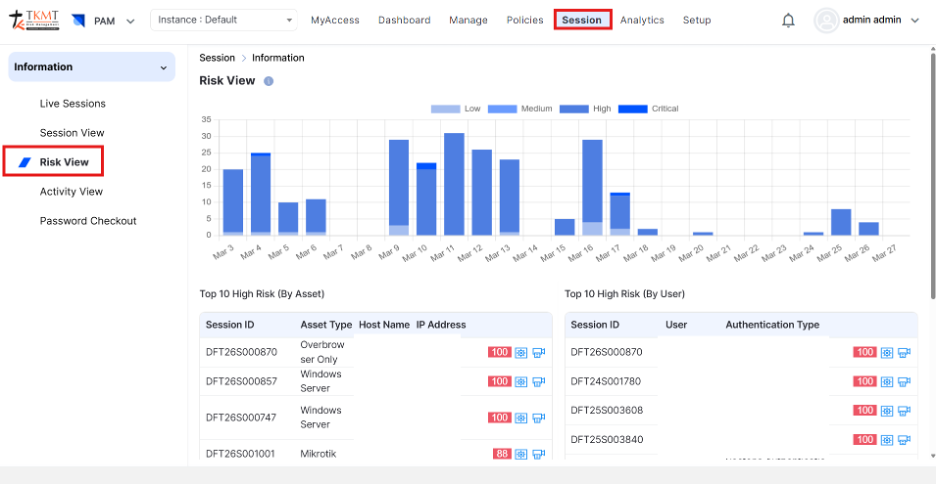
Threat Risk Analytics — ML-powered insights for session monitoring
The systematic recording of complete user sessions, with particular emphasis on privileged activities. This process enables continuous oversight for auditing and compliance purposes by providing organizations with the ability to monitor and review user actions either in real time or retrospectively. It ensures comprehensive visibility into critical operations.
Privileged Access denotes elevated permissions granted to individuals for the administration of sensitive systems, devices, or data. Because misuse or compromise of such access can lead to severe security threats and operational disruptions, close monitoring is imperative — facilitated by capturing detailed records of user behavior, supporting anomaly detection, incident investigation, and organizational accountability.
This capability assists auditors in fulfilling regulatory obligations by offering complete, searchable session records. Auditors can efficiently identify specific actions or commands, navigate directly to relevant timestamps, or review entire sessions as required. The ability to tailor search parameters further enhances the effectiveness and efficiency of user activity review.
A comprehensive system is capable of recording multiple types of sessions — including RDP, SSH, Telnet, browser-based interactions, and thick-client applications — whether accessed directly, over the internet, or through jump hosts. These sessions are typically captured in both video and text or command formats, offering a detailed and structured view of user activity. This level of visibility enables administrators and auditors to perform thorough analysis, respond more effectively to incidents, and strengthen overall risk management.
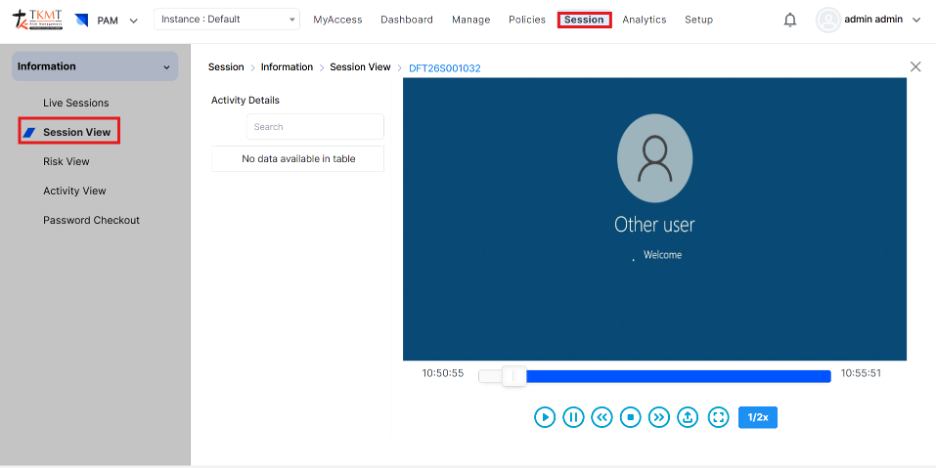
Operational Session Logging — complete and searchable session records
Session Collaboration allows multiple authorized users — such as administrators, auditors, and support teams — to securely join and engage in an active user session in real time. This feature enables seamless teamwork during critical operations, troubleshooting, and incident response, all without interrupting the original session.
By ensuring controlled and monitored access for every participant, Session Collaboration strengthens accountability while accelerating issue resolution. It also promotes transparency, as all activities within the shared session can be observed and, when necessary, recorded to support audit and compliance requirements.
For enterprises managing sensitive systems and privileged access, Session Collaboration represents a strategic capability that enhances operational efficiency, reinforces trust, and safeguards compliance. Every session initiation — whether through RDP, SSH, Telnet, browser-based access, or thick-client applications — is comprehensively captured. This includes RDP and SSH browser sessions conducted over the internet or via jump hosts, all meticulously recorded in both video and text/command formats to ensure complete visibility and accountability.
Enable Session Collaboration:
- Ensure that Session Collaboration is enabled within the assigned user access policy for the respective user.
- Login to the system and select PAM from Product Navigator.
- Initiate the session you intend to collaborate on from All Asset List.
- On the top right section, click on Collaborate.
- Session Collaboration Invite window will pop up. Fill in the Username, Email ID of the recipient, and Comment to the recipient.
- Activate the “Allow Control” option to grant the collaborator full control of the session screen.
- When the recipient clicks the link sent to their email, they will be granted access to collaborate on the active session.
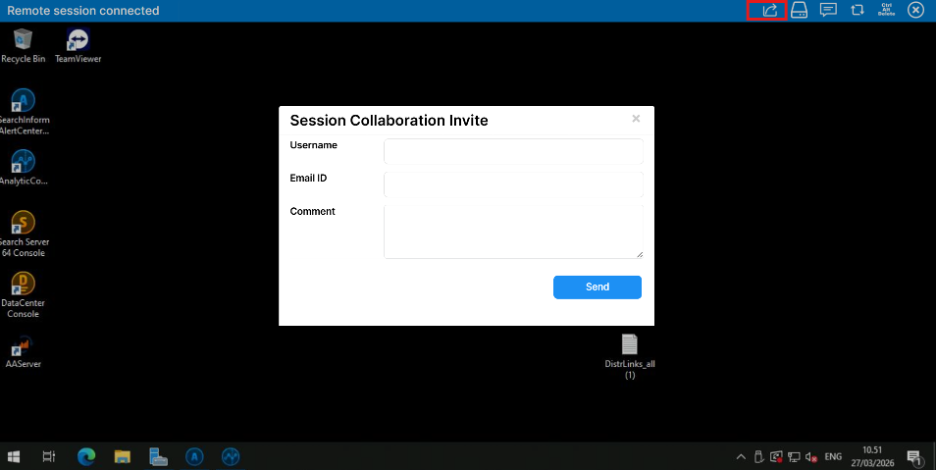
Session Collaboration — real-time secure multi-user session sharing